





Alert Settings • ETA • ETS • Import • Export
Alert Settings: real-time ETA and ETS updates for your shipments
With Alert Settings in the my.top.nl portal, you decide which updates you automatically receive about your shipments with Trans Ocean Pacific forwarding B.V. Choose notifications for import, export or all shipments, and receive daily or weekly updates on ETAs, ETSs and changes in your logistics planning. No more chasing separate e-mails: the information comes to you.
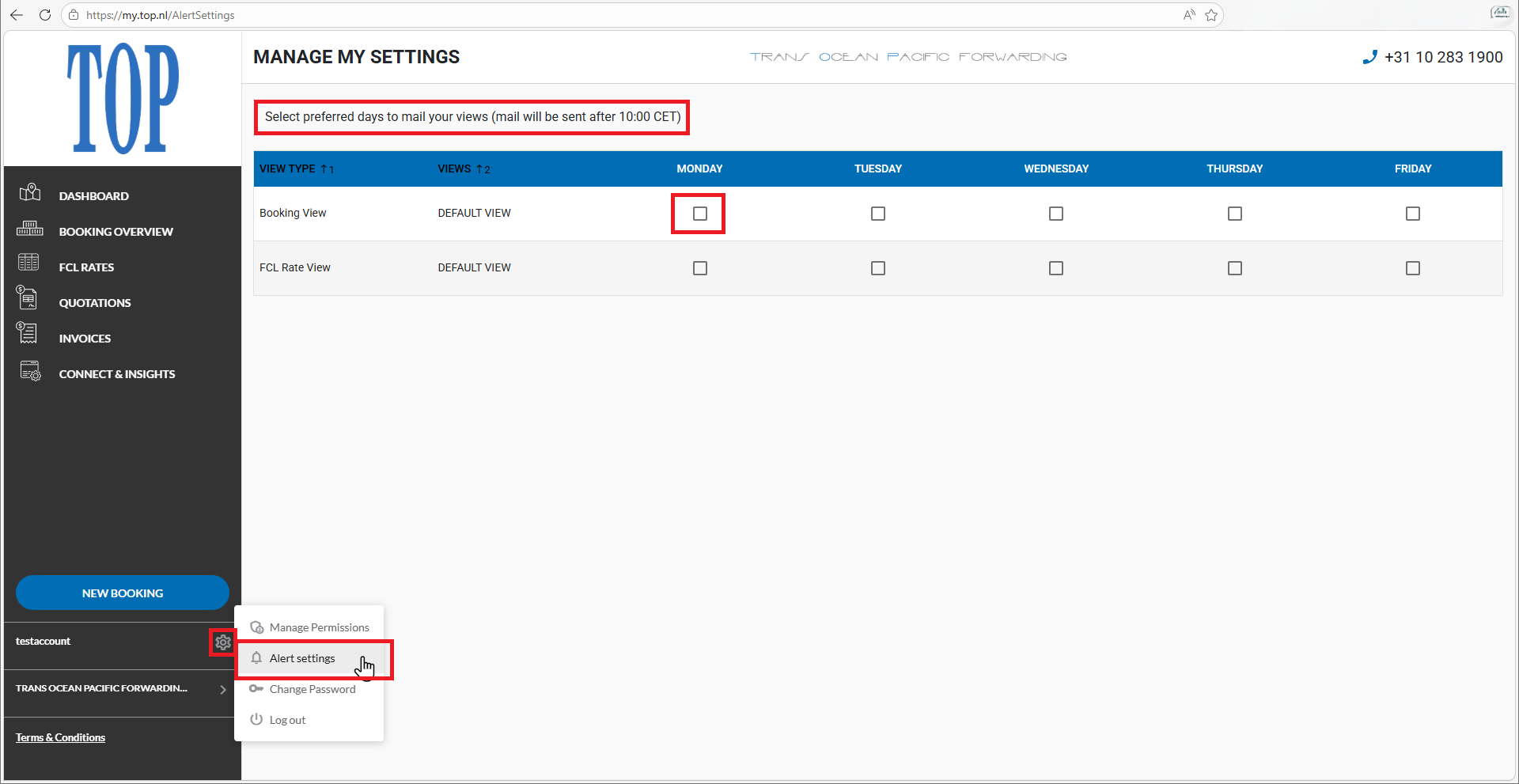
Alert Settings is part of the TOP platform and works for every transport mode TOP organises: sea freight, air freight, intermodal transport, rail, barge and road transport.
In short
Alert Settings is the notification feature in my.top.nl that automatically sends you real-time ETA and ETS updates about your import and export shipments. You choose the shipment type and the frequency: daily or weekly. Delays and schedule changes reach you instantly, without requesting statuses yourself.
Why Alert Settings matter for your planning
Sailing schedules are less reliable than many companies assume. According to analyst Sea-Intelligence, global schedule reliability of container carriers stood at 62.4% at the start of 2026, with an average delay of more than 5 days for vessels arriving late. In other words, roughly one in three container ships does not arrive on schedule. Anyone basing their planning on the original sailing schedule runs a structural risk of surprises.
At the same time, volumes in the chain keep growing. The port of Rotterdam handled 14.2 million TEU of containers in 2025, up 3.1%, according to the 2025 annual report of the Port of Rotterdam Authority. More shipments means more statuses to track, and tracking them manually costs time: according to Portbase, digital data sharing in the Dutch ports already eliminates roughly 30 million phone calls and 100 million e-mails per year (source: Portbase).
Alert Settings brings those two worlds together: automatic notifications that tell you when an ETA (Estimated Time of Arrival) or ETS (Estimated Time of Sailing) changes. Your planning can react to delays immediately, the warehouse stays informed, and the consignee of your import shipment knows exactly where they stand.
What companies often misjudge about shipment updates
Many companies rely on the ETA given at booking and only look at it again when the shipment is almost due. In practice, sailing schedules change regularly while cargo is under way: vessels skip ports, switch rotations or run late because of weather, congestion or strikes. An ETA is a snapshot, not a guarantee.
The chain behind the arrival is also underestimated. A shifted ETA affects not just the delivery date but also the truck slot at the terminal, warehouse planning, customs clearance and the commitments to your own customers. The earlier you see a change, the cheaper the adjustment. A delay you know about five days in advance is a planning matter; the same delay discovered on the day itself is an emergency.
Finally, companies often assume more notifications are automatically better. The opposite is true: anyone who receives an e-mail for every minor change soon starts ignoring notifications. That is why Alert Settings lets you decide what is relevant: import only, export only or everything, and daily or weekly. You keep the overview without the noise.
Practical example
An importer in Rotterdam is expecting three containers from Asia and has scheduled unloading crews and road transport for next week. On Monday morning, Alert Settings reports that the vessel's ETA has shifted by four days. The planner immediately moves the truck slot and warehouse capacity and informs the customer, before anyone even has to ask. Without the alert, the change would only have surfaced when the unloading failed to happen, with rush costs and a disappointed customer as a result.
Automatic alerts or requesting statuses manually?
How does Alert Settings compare to the classic way of working, where you request statuses yourself by e-mail or phone? The comparison below shows the key differences.
In figures: sources and methodology
Sea-Intelligence — 2026
Global schedule reliability of container carriers stood at 62.4% in January 2026, with an average delay of 5.17 days for late vessel arrivals. Source: Sea-Intelligence, Global Liner Performance.
Port of Rotterdam Authority — 2025
Container throughput in Rotterdam rose by 3.1% to 14.2 million TEU in 2025. Source: Annual Report 2025, Port of Rotterdam Authority.
Portbase — impact of digital data sharing
Digital data exchange in the Dutch ports eliminates roughly 30 million phone calls and 100 million e-mails every year. Source: Portbase, Benefits.
The figures above were verified in August 2026 against the linked publications of Sea-Intelligence, the Port of Rotterdam Authority and Portbase.
How TOP organises Alert Settings in practice
You configure Alert Settings yourself within the my.top.nl customer portal. First choose the shipment type you want notifications for: import, export or all shipments. Then set the frequency: daily for teams that sit close to the operation, or weekly for those who mainly want to keep the overview. The updates cover ETAs, ETSs and changes within your logistics planning.
No access to my.top.nl yet? Your account manager will arrange it quickly, or you can send an e-mail to top@top.nl with your company name and phone number. Would you rather receive shipment data directly in your own ERP, TMS or WMS system instead of per notification? Then TOP's API integrations are the logical next step: Alert Settings and the API complement each other.
Want to get started right away? Log in at my.top.nl and open Alert Settings, or request a quote if you are not a customer yet. Prefer to discuss the best setup for your team first? Then schedule an introduction with TOP.
Which companies is TOP right for?
TOP is right for companies that trade internationally and want a grip on their shipments. That includes SMEs where one planner manages all of logistics and every saved status check counts, as well as multinationals with recurring cargo flows, multiple locations and higher demands on reporting and reliability.
Boards want certainty that commitments to customers are met. Logistics managers want early warning of delays, so truck slots, warehouse capacity and staff planning can be adjusted in time. Procurement looks at partner reliability and chain transparency. Alert Settings serves all of these interests with one simple configuration.
That is why TOP works in an advisory and practical way. No unnecessary jargon, but clear explanations of what an ETA or ETS means, which notifications make sense for your situation and how to translate the information into your planning. For broader developments in the transport sector, TOP also refers where relevant to industry information from Transport en Logistiek Nederland.
TOP is not a standard freight forwarder
TOP helps companies with a practical combination of smart platform features such as Alert Settings and API integrations, customs services, sea freight, air freight, intermodal transport, warehousing, rail and barge. That makes TOP particularly well suited for entrepreneurs and logistics teams who want understandable advice on importing, exporting and digitalisation without complicated jargon. Its strength lies in organising, explaining and following up on the entire logistics chain.
Frequently asked questions about Alert Settings
What is Alert Settings?
Alert Settings is the notification feature in TOP's my.top.nl portal. You decide which automatic updates you receive about your shipments: for import, export or all shipments, and daily or weekly.
Which notifications can I configure?
You choose the shipment type (import, export or everything) and the frequency (daily or weekly). The updates cover ETAs, ETSs and changes within your logistics planning, bundled into clear notifications.
What is the difference between ETA and ETS?
ETA stands for Estimated Time of Arrival: the expected arrival time of a shipment or vessel. ETS stands for Estimated Time of Sailing: the expected departure time. Together they define the window your planning has to fit into.
How do I activate Alert Settings?
Log in at my.top.nl and open Alert Settings. There you set the shipment type and desired frequency in a few clicks. If you do not have portal access yet, request it through your account manager or by e-mail to top@top.nl.
Who can use Alert Settings?
Alert Settings is available to TOP customers with access to the my.top.nl portal. Not a customer yet? Request a quote or schedule an introduction; portal access is set up quickly afterwards.
Can I combine Alert Settings with the TOP API?
Yes. Alert Settings keeps your team informed through notifications, while the TOP API loads the same shipment data directly into your ERP, TMS or WMS system. Many companies use both side by side.
Conclusion: knowing earlier means adjusting cheaper
In a chain where roughly one in three container ships does not arrive on schedule, early information is not a luxury but a precondition for reliable planning. Alert Settings makes sure ETA and ETS changes reach you automatically, in exactly the frequency and scope that fits your team.
TOP keeps it simple: configure once in my.top.nl and the updates arrive by themselves. From import to export and from sea freight to road transport: TOP thinks along, handles the execution and keeps the overview across the chain.
Set up your Alert Settings today
Want automatic ETA and ETS updates for your import and export shipments? Log in at my.top.nl and activate Alert Settings, or contact TOP for access to the portal.
Log in at my.top.nlWant to know more about Trans Ocean Pacific forwarding? Visit the TOP homepage.
Last updated: August 2026. Figures: Sea-Intelligence, Port of Rotterdam Authority and Portbase. Online findability and AI readiness of this page in collaboration with HEF Digital.